
The programming languages become handier when the user can create a link between two pieces of compiled codes operating from two different locations.
In this example, a simple server that takes a text string from the client and returned in upper case is discussed. Hope this will give an overall picture about how socket programming work in JAVA.
You do not have to be an expert in Java and all you need is a Java compiler.
Let us get started;
or you can simply download TCPClient.java and TCPServer.java from here.
Server side code
import java.io.*;
import java.net.*;
class TCPServer {
public static void main(String argv[]) throws Exception {
String clientSentence;
String capitalizedSentence;
ServerSocket welcomeSocket = new ServerSocket(6789);
while(true) {
Socket connectionSocket = welcomeSocket.accept();
BufferedReader inFromClient = new BufferedReader(new InputStreamReader(connectionSocket.getInputStream()));
DataOutputStream outToClient = new DataOutputStream(connectionSocket.getOutputStream());
System.out.println(“Server waiting for data…”);
clientSentence = inFromClient.readLine();
System.out.println(“Recived from client : ” + clientSentence);
capitalizedSentence = clientSentence.toUpperCase() + ‘n’;
outToClient.writeBytes(capitalizedSentence);
}
}
}
Client Side code
import java.io.*;
import java.net.*;
class TCPClient {
public static void main(String argv[]) throws Exception {
String sentence;
String modifiedSentence;
BufferedReader inFromUser = new BufferedReader(new InputStreamReader(System.in));
Socket clientSocket = new Socket(“localhost”, 6789);
DataOutputStream outToServer = new DataOutputStream(clientSocket.getOutputStream());
BufferedReader inFromServer = new BufferedReader(new InputStreamReader(clientSocket.getInputStream()));
System.out.print(“SEND TO SERVER: “);
sentence = inFromUser.readLine();
outToServer.writeBytes(sentence + ‘n’);
modifiedSentence = inFromServer.readLine();
System.out.println(“FROM SERVER: ” + modifiedSentence);
clientSocket.close();
}
}
You have just created a client server application. Now let us see how it works in real time.
You are ready to go.
Write some text in any case on the client program and press enter.
Your server, which is running on the other command prompt, will convert it to uppercase and send it back to the clients’ command prompt.
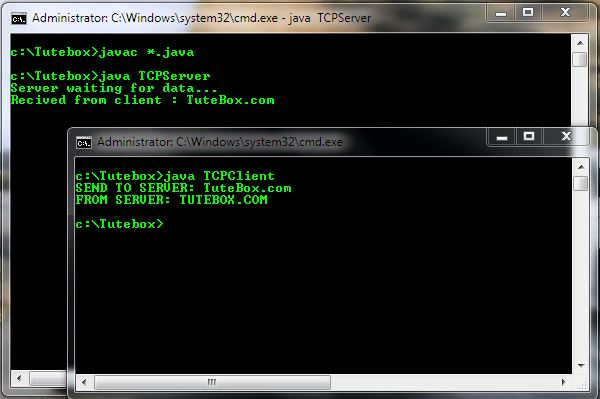
TCP Client Server demo
“Knowledge belongs to world and Be proud to pass it on” – Tutebox
Comments are closed.



Nice to have you back. And again with the interesting posting.
hey, good job as always genius. 🙂 # * **** * #
Thanks alot CuteGirl 😉
it was very interesting to read http://www.tutebox.com
I want to quote your post in my blog. It can?
And you et an account on Twitter?
Nice post… keep writing…
I really love the topic that you shared. Thank you for posting.
I have doubt ..
scenario -> we have 2 clients and server.
Client A has connected with Server… but message is not sent yet!
Client B is connecting and sending message..
if i close the A what will happen to Client B’s Message ?
How to manage these kind a problems???
Easiest solution for these kind of scenario is to choose different ports to communicate..
Nice……keep it ON!!1
I want to play my Chess application in LAN,which developed in java…………
will u plz help??